


Truple - Online Accountability
4.4406.00 Reviews
App Specs
- Version
- 2.9.8
- Updated On
- License
- Free
- Downloads
- 50,000+
- Developer
- Truple
- Categories
- Parenting
- Platform
- Android
Screenshots
 Analysis by AppCompare
I’d approach Truple - Online Accountability as a tool for making online choices visible, rather than as a simple screen-time timer. That difference matters: a timer can show how long someone used a device, while an accountability setup asks the person using it to agree that a trusted other may review aspects of that activity. For families or individuals who want that kind of shared commitment, the idea can be useful. For anyone who needs quiet, private self-tracking, it may feel like too much.
What accountability looks like in daily life
A realistic use might be a parent and teenager agreeing on a specific purpose before installing the app: for example, helping the teen stick to a shared plan for device use after homework. The conversation should come first. Explain who will receive updates, what those updates involve, and when the arrangement will be revisited. Without that agreement, monitoring can feel less like support and more like a breach of trust, even if the family’s intentions are good.
The same principle applies to adults who choose an accountability partner for their own habits. Someone trying to avoid distracting browsing during work could ask a trusted friend to review activity and discuss patterns at an agreed time. That can make a private intention more concrete, but it works best when both people know what the arrangement is for and what they will do with the information. A screenshot or website record is a prompt for a conversation, not a complete explanation of someone’s motives.
Choosing the right person and setting expectations
I would be deliberate about who receives updates. A supportive friend, family member, or mentor is more likely to help than someone who reacts with shame or turns every concern into a confrontation. Before setup, agree on practical boundaries: how often you will talk about activity, what counts as a genuine concern, and how the person being monitored can raise a privacy worry. Those ground rules make the relationship part of the accountability plan instead of leaving the app to carry the whole burden.
It is also worth deciding whether the goal is personal habit change, a family agreement, or a safety conversation. Those aims are related, but they are not identical. A parent trying to guide a younger child may need a different level of oversight than an adult who wants help keeping focused. I would avoid treating one configuration as suitable for every household member; the arrangement should match the person’s age, maturity, needs, and willingness to participate.
How it differs from familiar alternatives
Many people begin with built-in screen-time controls, browser restrictions, or a basic usage dashboard. Those tools can be a better fit when the main goal is to set limits or see time totals without sharing detailed activity with another person. Truple’s distinctive angle is the involvement of accountability partners and its focus on activity visibility. That creates a different kind of commitment: it may help when a person wants another set of eyes, but it is not automatically better than a limit-setting tool.
Compared with a simple website blocker, this approach is less about preventing access in advance and more about making behavior reviewable. That can be useful when someone is trying to build awareness rather than rely on a hard block. The trade-off is that review and discussion take effort. If a household only wants to schedule device downtime or restrict a few sites, a straightforward parental-control option may be less complicated and less sensitive.
Worth Reading Before You Choose

Flipboard Shows What News Apps Must Do Beyond the Feed

Switching to Android Auto Means Rethinking Your Driving Routine

Google Calendar Makes a Crowded Week Easier to Manage

Ludo King Makes the Most of the Minutes Between Plans

Baby Panda World Brings Quick Play to Modern Phones, but Its Game Library Feels Busy

ESPN’s Live Game View Makes Following Close Games Easier
Small habits that make the setup more useful
One practical tip is to begin with a narrow goal instead of trying to supervise every part of someone’s digital life. Agree on the concern you actually want to address, then choose the settings and accountability routine around it. A broad arrangement can create unnecessary tension and make it harder to tell whether the app is helping. A limited, clearly explained trial gives both people a chance to see whether the process feels fair and useful.
Another useful habit is to treat alerts or captured activity as a starting point, not a verdict. A site visit may have a legitimate reason, and a brief snapshot cannot tell the whole story. If something looks unexpected, ask calmly before drawing conclusions. This is especially important in family use: a monitoring tool can support a conversation, but it cannot replace a parent’s judgement, a child’s explanation, or a broader discussion about online safety.
For someone using the app to manage personal distractions, the partner should help turn observations into a specific next step. That might mean changing a routine, talking through a recurring trigger, or agreeing to check in again. Merely receiving reports without discussing them can make accountability feel like surveillance while offering little practical benefit. The human follow-through is a real part of the system, not an optional extra.
Getting Started with Truple
First off, downloading and setting up Truple - Online Accountability is a breeze. Available on both Android and iOS, it’s super easy to find in the app stores. Once you’ve got it installed, you’ll be prompted to create an account. This is where Truple starts to stand out from the crowd—it’s all about transparency and accountability.
The setup process involves choosing your accountability partners. These are the folks who will receive updates about your online activity. It’s a unique feature that really hammers home the app’s purpose. You can select trusted friends, family members, or even a mentor. Just make sure they’re cool with getting those notifications!
Features That Make Truple Stand Out
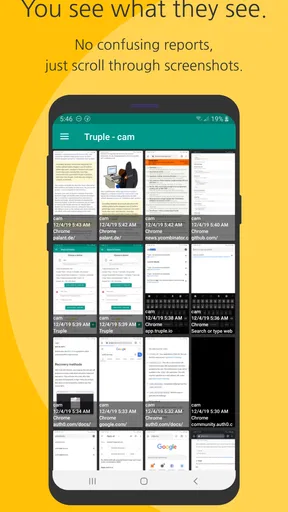
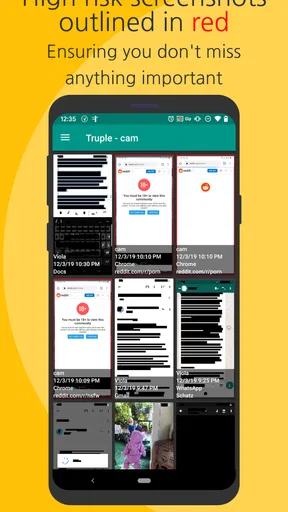
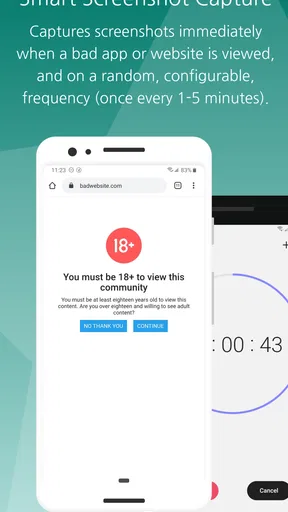
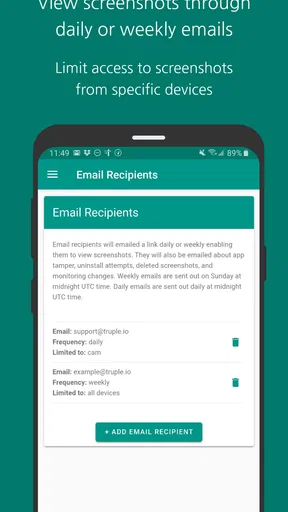
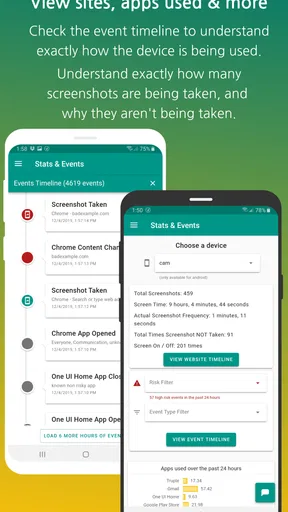
So, what exactly does Truple offer? At its core, the app provides regular screenshots of your device’s activity. This means your accountability partners can see what you’re up to, helping you stay on track. The screenshots are taken at random intervals, keeping you on your toes.
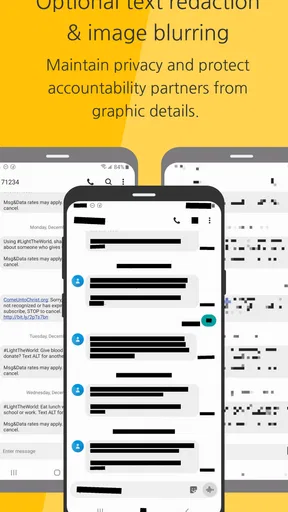
The privacy settings are pretty solid too. You have control over what’s captured, and sensitive information can be blurred out. This is a big win for anyone concerned about privacy while still wanting the accountability factor.
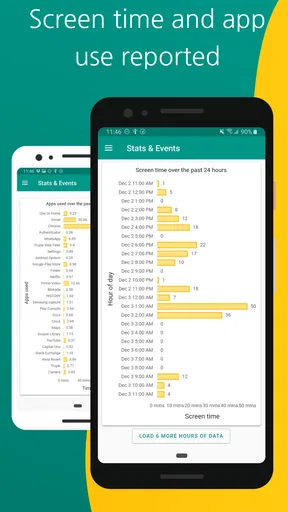
Another neat feature is the website logging. Truple keeps track of the sites you visit, which can be super helpful if you’re trying to cut down on distractions or avoid certain types of content. You can even set up alerts for specific websites, giving you a gentle nudge if you’re spending too much time on them.
User Experience and Interface
As for the user interface, it’s clean and straightforward. The dashboard is easy to navigate, and the settings are intuitive. You won’t find yourself fumbling around trying to figure out how to tweak things to your liking. Plus, the app runs smoothly without any noticeable lag, which is always a bonus.
One thing I really appreciated was the level of customization available. You can adjust how frequently screenshots are taken, who receives them, and even what days and times the app is active. It’s flexible enough to fit various lifestyles and needs.
Why You Might Want to Try Truple
If you’re on the fence about whether Truple is right for you, consider this: it’s an excellent tool for anyone struggling to maintain good digital habits. Whether you’re looking to reduce screen time, avoid procrastination, or just be more mindful about your online activity, Truple provides that extra layer of motivation.
It’s also great for families. Parents looking to keep an eye on their kids’ online activity without being overly intrusive might find this app particularly useful. The balance between privacy and accountability is well-managed, making it suitable for all ages.
Who should think twice
I would skip this approach if the person whose activity is being reviewed has not agreed to it, or if the relationship is already strained by mistrust. More visibility does not automatically create better habits. In some homes, a conversation about expectations, device-free times, and age-appropriate boundaries will be a healthier starting point than sharing activity records.
It may also be the wrong choice for someone who wants only a private productivity aid. Truple involves other people by design, so it asks for trust and coordination as well as installation. If you do not have an accountability partner who can respond constructively, a personal diary, a timer, or the device’s own usage controls may suit you better.
Privacy, cost, and practical expectations
Because screenshots and website activity can be sensitive, I would check the privacy controls with the other person before relying on them. Decide what should be blurred and consider whether a shared device might display personal information belonging to someone else. A responsible setup should account for everyone who uses the device, not just the person whose habits are being addressed. The app’s visibility can be valuable, but it deserves thoughtful boundaries.
The app is free to download, with in-app purchases listed from $4.99 to $159.99 per item. I would review the available purchase terms in the store before committing, and make sure the intended setup fits the household’s budget. The Everyone age rating is a content classification, not a recommendation that every child should use the same monitoring arrangement; parents still need to make a decision that fits their family.
Truple is a Parenting app from Truple, with an average rating of 4.5 from 894 ratings, 377 written reviews, and more than 50,000 installs. It was released on April 12, 2017, and version 2.8.9 is the current version. Those details show an established product with an ongoing version history, but they do not tell me how a particular family’s setup will work. I would check compatibility on the device before installing; the listed minimum operating system is version 7.0.
What to watch as you use it
The most meaningful test is not whether the app produces a report; it is whether the arrangement improves the conversation around online habits. After using it for a while, ask whether the chosen partner is responding supportively, whether the agreed goal still makes sense, and whether the level of visibility feels proportionate. If the setup creates more conflict than clarity, revise the boundaries or choose a less intrusive tool.
Product version numbers can tell you which release you are considering, but they are not a substitute for checking how it behaves on your own device. If you are moving from another monitoring tool, do not assume its settings or routines will carry over. Revisit who receives updates, what is visible, and which alerts matter to you. A quick review after installation can prevent old assumptions from shaping a new arrangement.
I would also keep expectations modest about what any monitoring app can accomplish. It can make activity easier to discuss, but it cannot identify every reason behind a habit, guarantee that someone will change, or replace parental guidance. Truple is strongest when the user wants accountability and the partner is ready to provide calm, consistent support. Used with clear consent and a specific purpose, it can turn an abstract intention into a more concrete routine.
Wrapping It Up
All in all, Truple - Online Accountability is a unique app that brings something fresh to the table. It’s not just about monitoring; it’s about fostering a sense of responsibility and self-awareness when it comes to digital consumption.
Whether you’re using it for personal growth or to keep tabs on your family’s online habits, it’s a powerful tool that’s worth checking out. So, why not give it a shot and see how it can help you or your loved ones stay accountable online?
Pros
- Supports multiple devices for easy access.
- Real-time screenshot monitoring feature.
- Highly customizable settings for users.
- Strong encryption ensures data privacy.
- User-friendly interface and navigation.
Cons
- Subscription required for full features.
- May use significant battery power.
- Limited offline functionality.
- Notifications can be overwhelming.
- Requires internet for optimal use.
FAQs for Truple - Online Accountability
What is Truple - Online Accountability and how does it work?
Truple - Online Accountability is a monitoring app designed to promote transparency and accountability in digital usage. It works by capturing periodic screenshots of your device and sending them to a designated accountability partner. This helps users maintain focus and resist distractions, fostering healthier digital habits.
Is Truple - Online Accountability secure and private?
Yes, Truple prioritizes user privacy and security. Screenshots are encrypted both in transit and at rest, ensuring that only authorized accountability partners can view them. Users have control over screenshot frequency and times, and the app complies with privacy regulations to protect user data.
Can Truple be used on multiple devices?
Truple supports multiple devices, allowing users to monitor activity across different platforms. Whether on Android or iOS, users can sync their devices to a single account, ensuring comprehensive tracking and accountability. This feature is especially useful for families or individuals with multiple gadgets.
What are the customization options available in Truple?
Truple offers various customization options to tailor the monitoring experience. Users can set screenshot intervals, choose specific times for monitoring, and select which apps or activities to track. This flexibility allows users to focus on areas where they need accountability the most, enhancing the app's effectiveness.
Is there a cost associated with using Truple - Online Accountability?
Truple offers both free and premium subscription plans. The free version provides basic monitoring features, while the premium plan unlocks advanced options like more frequent screenshots, priority support, and enhanced security features. Users can choose the plan that best fits their accountability needs.


